
Most property owners keep their records in several places: a title deed in a drawer, receipts in a bag, due dates in their head. Malo brings them together in one vault on the phone you already have. You do not have to fill it all on the first day.
A new Malo account opens on Home with a Get started card showing three steps rather than empty pages. Each step ticks itself off once your account holds one, and a bar shows how many are done. When all three are done, the card goes away.
Step 1: add your first property
Tap +, then New property. Malo first asks what it is: a plot to build on, a plot you are buying by instalments, farm land, a house or flat you let, a building with several units, or a building under construction. Your choice sets up a starting record that you can change at any time.
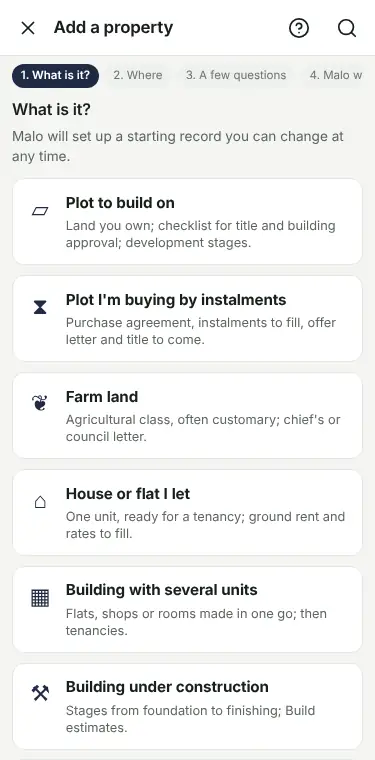
Next comes where it is: the name you use for it, the province and district, and the nearest landmark, so that anyone can find it. A few short questions follow, and only the ones that apply, such as how the land is held. Before anything is saved, Malo shows what it will create: the documents to expect, the payments to fill and any units. The title and the boundary can come later.
Step 2: add one thing that falls due
Ground rent, council rates, an instalment on a plot or a tenant’s rent: add one of them with its amount and due date. Malo then reminds you by email before it falls due, so nothing slips past. For a tenancy, you choose how many days before the due date the reminders go out, and how often while the rent is overdue.
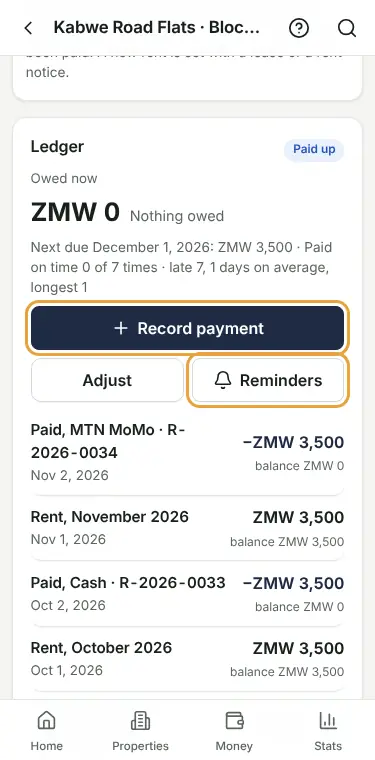
Malo never guesses an amount. A payment it suggests from your answers stays marked To fill, with no reminders, until you type in the amount and the date.
Step 3: keep one document
Open the property and tap + Document, then photograph or upload a title deed, an offer letter or a receipt. Malo reads the text and suggests the type of document, its dates and amounts, which you then check.
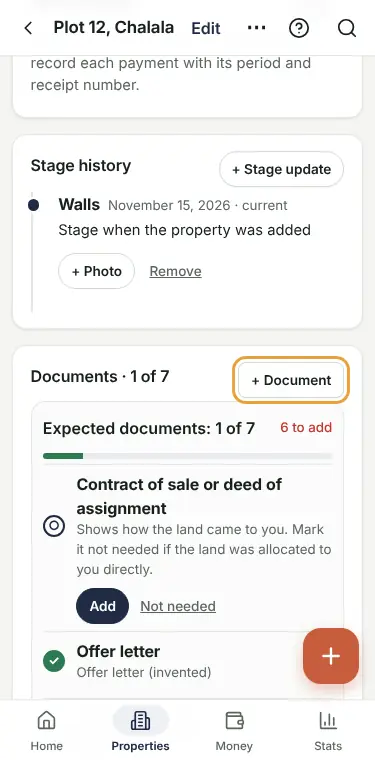
Each property also keeps a list of expected documents, so you can see at a glance which papers are still missing.
Not ready to type your own records?
Under the Get started card, Try the demo opens a private demo vault of invented properties, tenants and payments, made for you alone. Every screen works there, nothing leaves Malo, and the demo clears itself after seven days. It is a safe place to look around before you add your own.